Features

An invoice in 30 seconds

Pick the customer, add the items and send. The app remembers everything for next time.

Czech or English documents

Use the app in English and send invoices in Czech, English, or by the customer’s country.

VAT without retyping

Download the VAT return, control statement and EC Sales List as XML for MOJE daně.

You work in English.
Your customer reads their language.

The app language is your personal setting. The document language is a company setting: Czech, English, or automatic,
which means Czech for customers in the Czech Republic and Slovakia and English for everyone else.
English interfaceDocuments, customers, settings
Czech terms kept“Tax point date (DUZP)”
Czech or English documentsFor all, or by customer country
Separate settingsWork in English, invoice in Czech
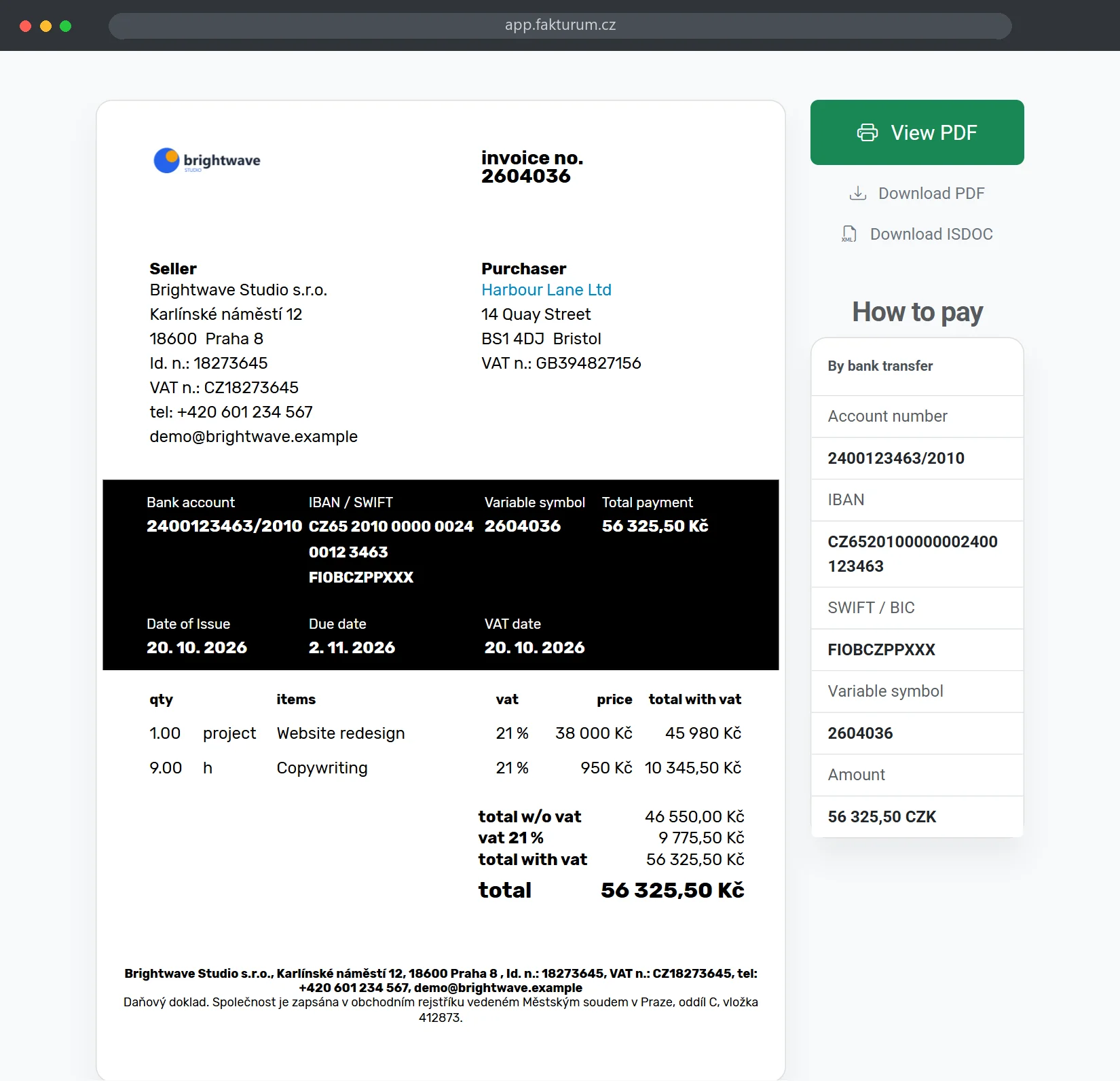
An English invoice for a customer abroad, with IBAN and SWIFT

The English interface is in beta. VAT reports, bank statement import, inventory and data imports are still being translated, so you may see some Czech there.
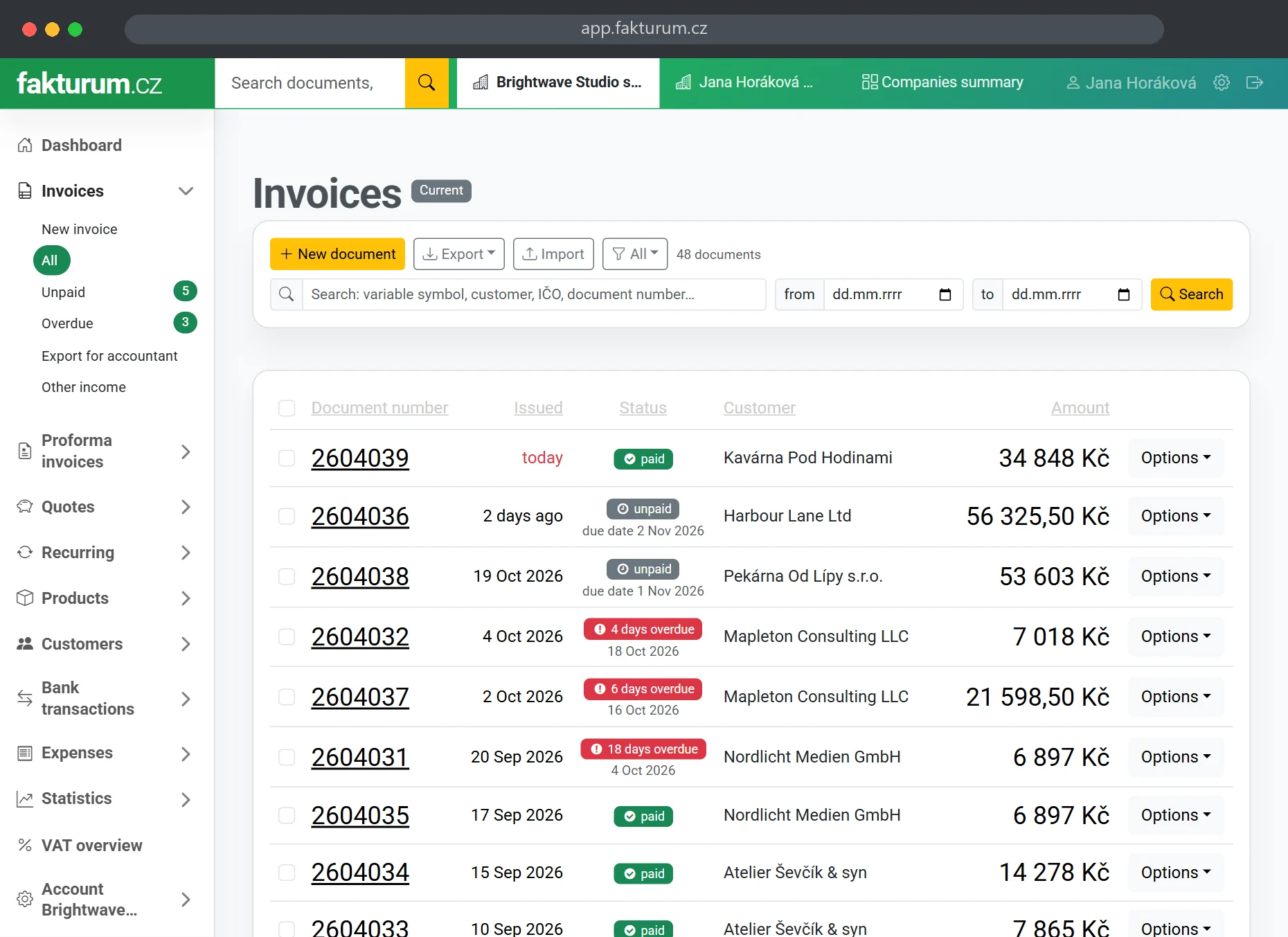
List of invoices with payment status and due dates

All your documents
in one place

Invoices, quotes, proforma invoices, orders, cash vouchers and delivery notes. Everything in one place and linked with one click.

InvoicesDone in a minute, professional look
QuotesTo an invoice in one click
OrdersClear overview
Proforma invoicesTo a final invoice in one click
Recurring invoicesIssued for you automatically
Delivery notesPrint in one click
Cash vouchersCash in and cash out
Credit notes and cancellationCorrective tax documents
ExpensesAll your costs in one place
InventoryReceipts, issues, stocktakes
TagsSort documents your way
AttachmentsContracts, photos, paperwork
DraftsUnfinished document, no number yet
Expense numbersRefer to a specific receipt
Own number seriesPrefix, year, month, sequence
Preview before savingSee the document before it exists

Stop retyping
receipts and invoices

In Expenses you drop in a whole pile of documents, phone photos included, and we read the supplier, company ID, amounts and VAT breakdown.
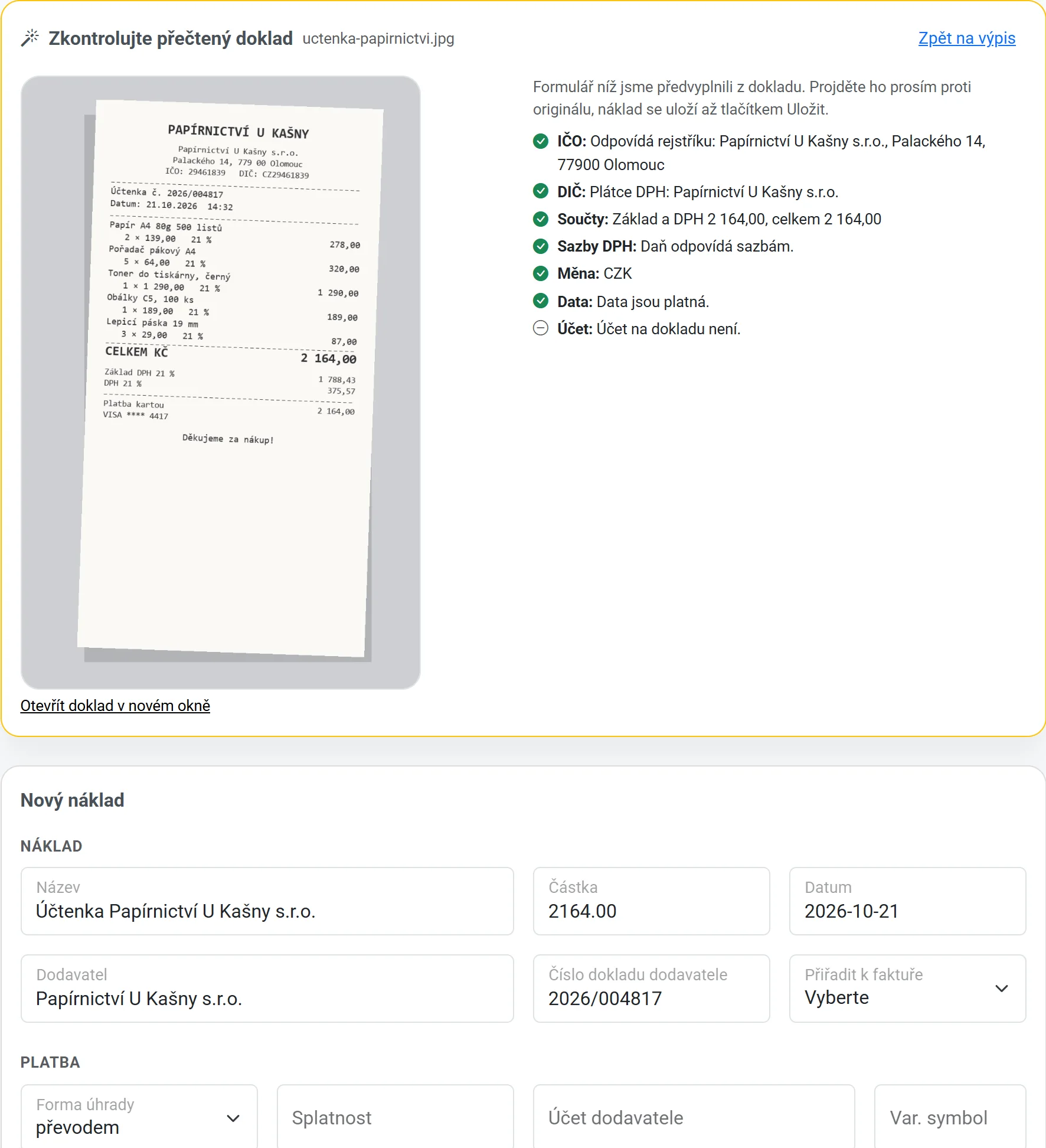
Each document then waits pre-filled next to the original. You just check it and save.
A whole pile at oncePDFs and phone photos
Read by AISupplier, amounts and VAT
You just checkNext to the original
Verified IČO and DIČCompany and VAT registers
VAT done rightReverse charge, EU, foreign VAT
Foreign currenciesRate on the issue date
Duplicate checkWarns about the same document
You know where it goesConsent once per company
A receipt that was read, next to the pre-filled expense form with verified company ID and VAT number

Free plan: 5 documents to try. Standard: 2 a month. Business: 200 a month. Pricing · How it works
Documents are read by the Claude model from Anthropic; it gets nothing else from your account.

No retyping

Already invoicing somewhere else? Upload your list of invoices, customers and price list, and the app finds the columns itself.
Your document numbers stay yours, and your next invoice continues the series.
Invoices from CSVFrom Fakturoid, iDoklad or Excel
Customers from CSVNo duplicate contacts
Price list from CSVDuplicates by SKU or EAN
Received invoices from ISDOCIncluding the VAT breakdown
ISDOC in PDF and ZIPA whole batch at once
XML from POHODAHandover with your accountant
Preview before savingNothing saved until you confirm
Undo an importWith one button
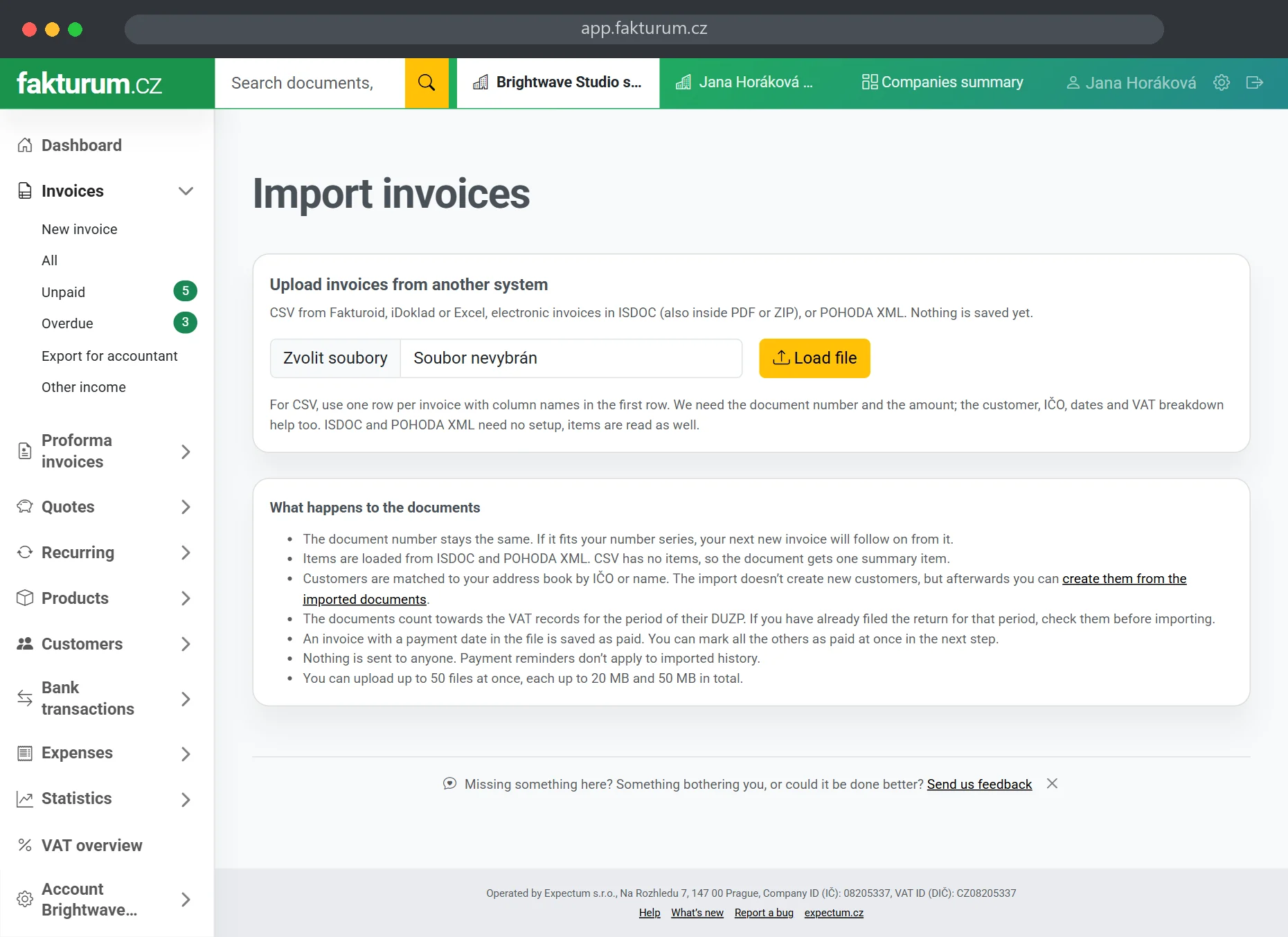
Importing invoices from another tool, with a preview

You see a preview before anything is saved. And if it was the wrong file, you undo the import with one button.

Features that
save you time

The app works for you. It watches due dates, matches payments and sends reminders, even while you sleep.
Payment matchingPaired with the invoice automatically
RemindersSent automatically when overdue
QR payment codeYour customer pays straight away
PDF by emailSent in two clicks
Client approvalQuotes confirmed online
Public linkDocument available online
Custom emailsTemplates and sender name
Document designsLogo, colour, style
Company lookup3 million Company IDs (IČO)
Unreliable VAT payerChecked before you issue
Did the customer see it?Who opened the document and when
Your own mail serverDocuments leave from your address
APIConnect your e-shop and other systems
Bulk sendingSelected documents to everyone at once
Item suggestionsYour price list as you type
Who prepared the quoteName and phone on the quote
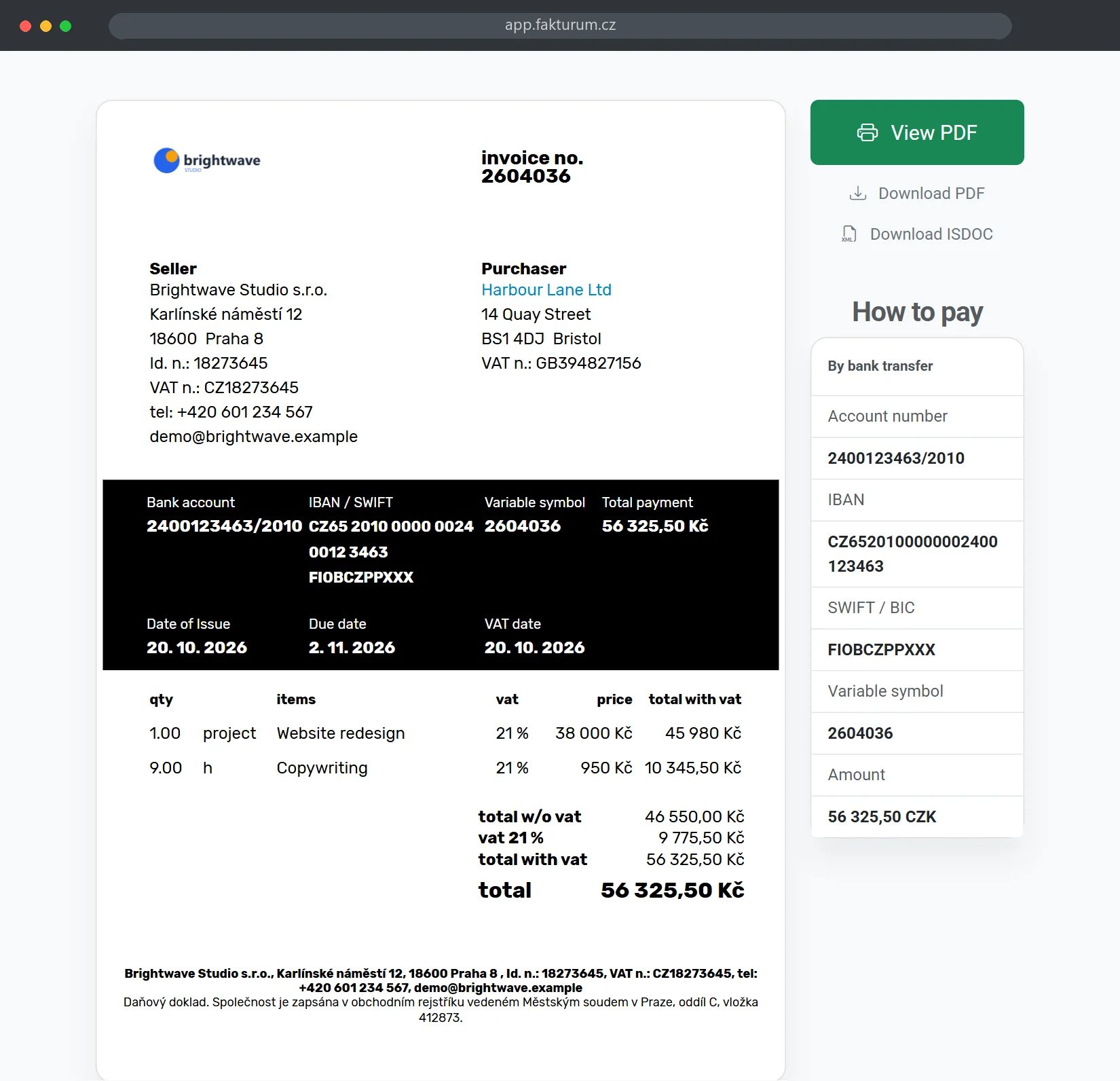
An invoice as your customer sees it: PDF, bank transfer details and IBAN

Tax office paperwork
prepared for you

Are you a VAT payer (plátce DPH)? The VAT return, control statement and EC Sales List are built from the documents already in the app.
Download them as XML for the MOJE daně portal, no retyping into forms.
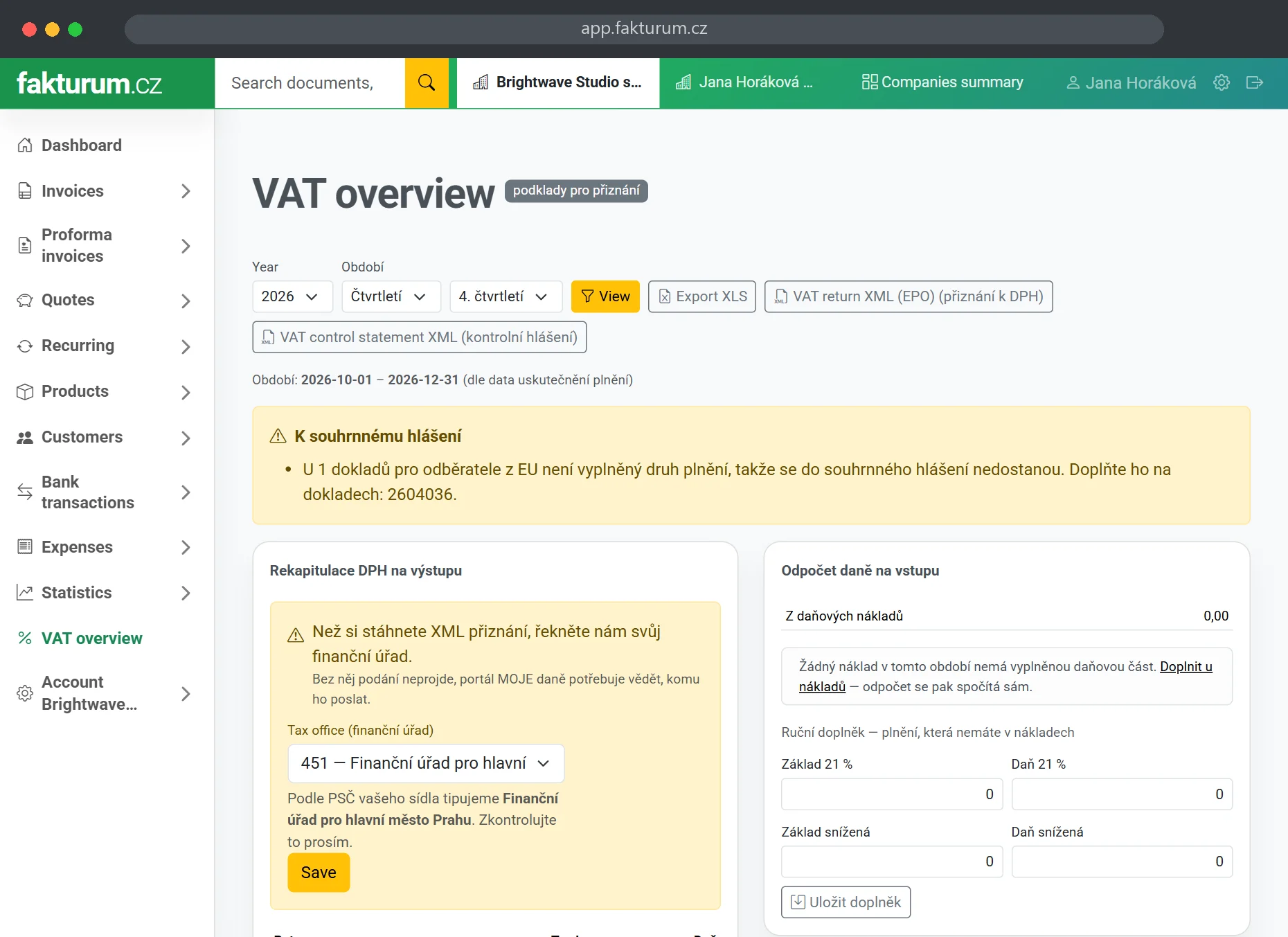
VAT overviewDocument ledger for the period
VAT returnPřiznání k DPH, XML for MOJE daně
VAT control statementKontrolní hlášení, sections A and B
EC Sales ListSouhrnné hlášení, supplies to the EU
Reverse chargeWith the tax rate on the document
Expense as a tax documentClaim VAT from receipts
Exports outside the EUCorrect line on the return
ČNB exchange ratesLoaded for every document
VAT overview with records, VAT return and control statement

The reports are a basis for filing. We recommend checking them with your accountant before you submit.

The new EET won’t catch you off guard

From 1 January 2027, payments received in person or at your premises must be registered again, whether the customer pays in cash, by card or by QR code.
Fakturum has it ready and tested against the Financial Administration’s test environment, so you don’t need new software for 2027.

Sending the saleRight when you save the document
Confirmation code (POK)Printed on the document
Connection outageThe sale is sent later
Switch on each documentYou decide what is registered
Cash vouchersRegistered by default
RefundsSent as a negative sale
Cash register certificateStored encrypted
Foreign currency documentsConverted at the document rate

We will switch the module on once the Financial Administration starts issuing live certificates, from November 2026. Until then we are fine-tuning it in the test environment. More about the new EET.
The law was passed and signed in September 2026. The obligation applies from 1 January 2027.

From bank statement to paid invoice
without the clicking

Upload your bank statement and the app finds which invoices are paid and which expenses are settled.
It handles partial payments too, and one payment split across several documents.

Statement importGPC/ABO or CSV from any bank
Incoming paymentsMatched to invoices
Outgoing paymentsMatched to expenses
Partial paymentsSee what is left to pay
Payment recordsPayment history on each document
Split paymentOne payment, several documents
Document from a transactionTurn a payment into a document
Multiple accountsEach with its own settings
QR payment for expensesPay a received invoice right away
Payment batchPayment orders for your bank

Stock that almost
keeps itself

Do you sell goods? The invoice deducts them from stock, you record a delivery with a goods receipt and count a stocktake with your phone in your hand. The quantity in stock and movement history are in every plan. More about inventory
Goods or serviceStock only where it makes sense
Invoices deduct stockDeleting one returns the goods
Movement historyWho, when and how many
Goods receiptsWith purchase prices
Goods issuesSamples, own use, damage
StocktakeStep by step, on your phone
Stock valueToday or at year end
Minimum stockWarns you when goods run low
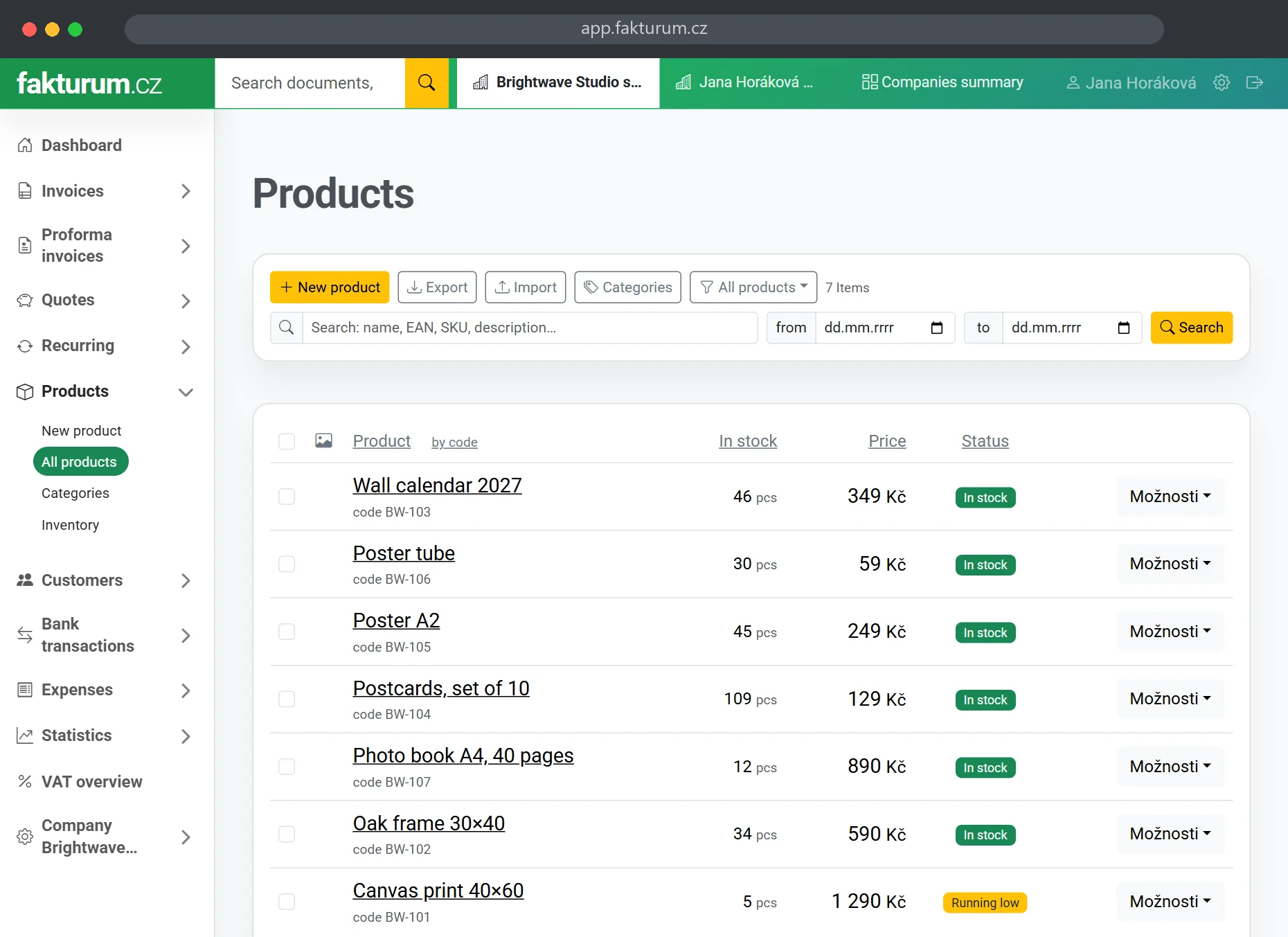
Product list with quantities in stock and a low stock badge
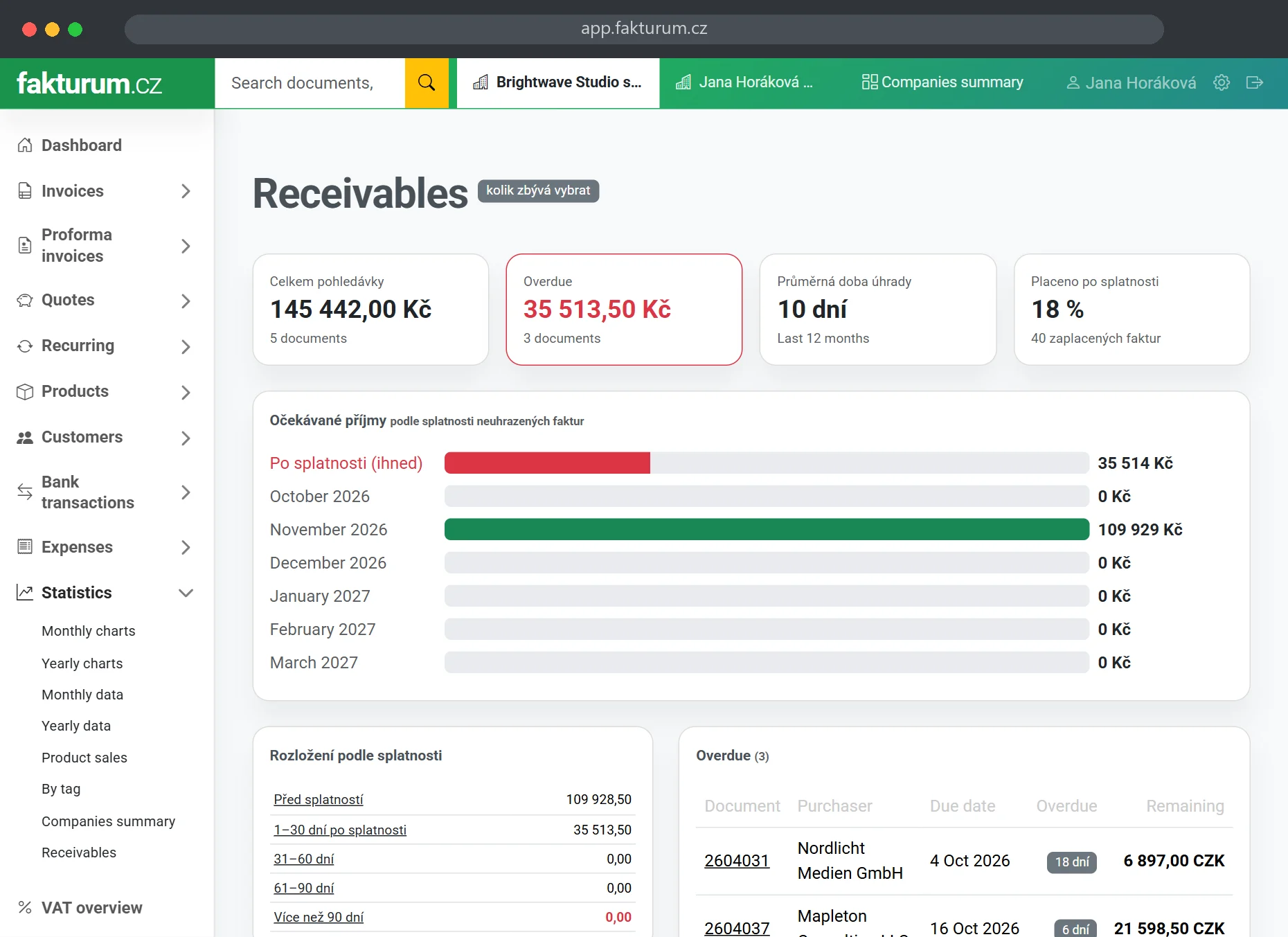
Receivables by age and who pays late

Know who owes you
and when they’ll pay

Revenue, overdue receivables, how quickly each customer pays and your expected income. All in one place.

DashboardUnpaid invoices and earnings
StatisticsComparisons and forecasts
ReceivablesWho owes you and for how long
Payment behaviourAverage time to pay
Income forecastCash flow by due date
Export for your accountantISDOC, POHODA, XLS, PDF
Foreign currenciesEUR, USD and more
User rolesInvoicing, accountant, expenses only
VAT threshold watchNon-payers see the CZK 2M limit coming
Two-factor sign-inA code from your phone as well
Payables forecastWhat you owe and when
Copy between companiesMove a document to another Company ID

See only what
you actually use

Everything is included in the price, you just don’t have to see all of it. Right after you sign up, we ask what you want to use and set up the app accordingly.
What you don’t need disappears from the menu. Change your mind any time with one switch in the settings.
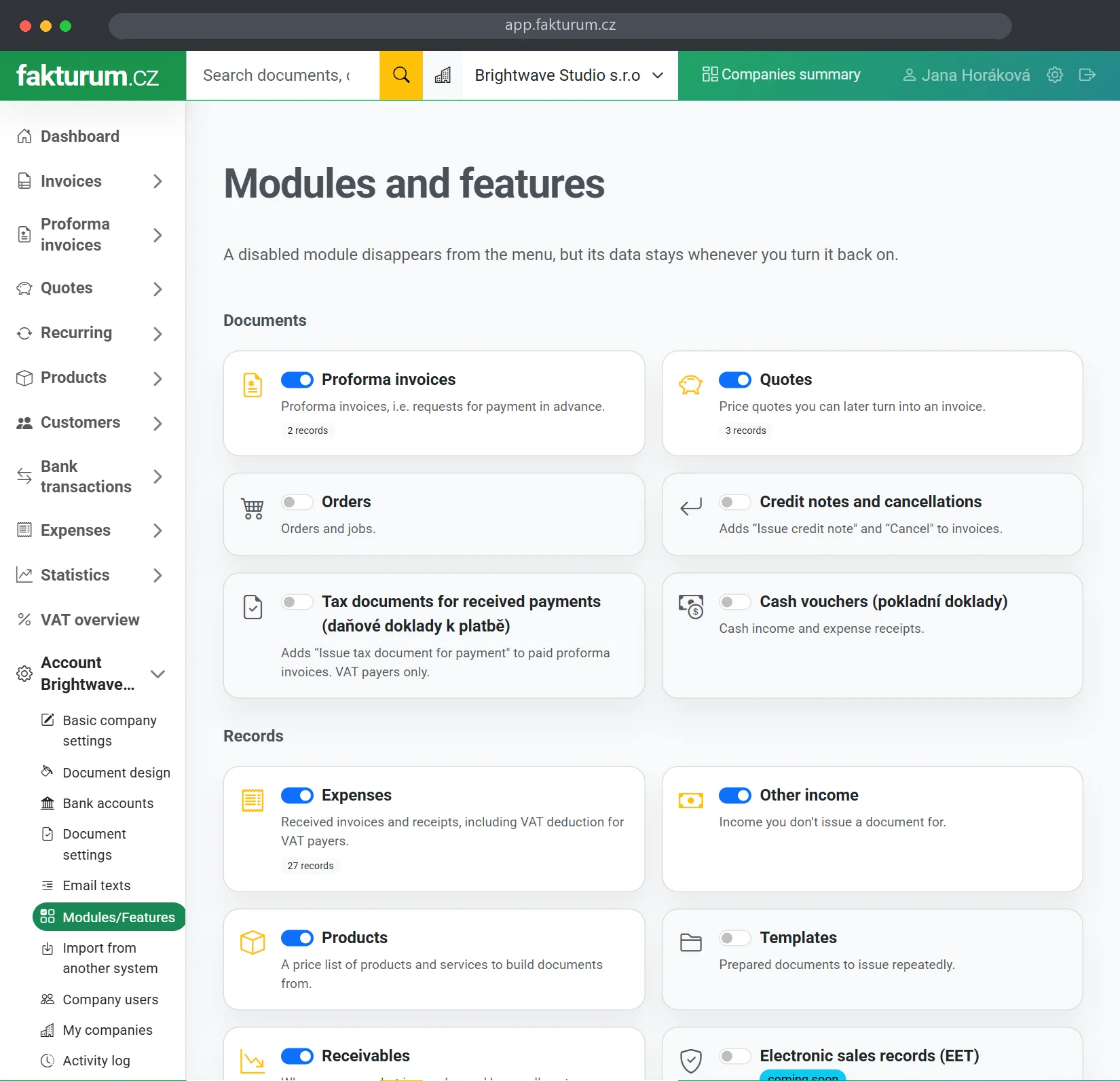
Modules and features: switch off what you don’t need
Quotesand their approval
Proforma invoicesproformas and payment requests
Ordersorder management
Cash voucherscash in and cash out
Credit notes and cancellationcorrective tax documents
Tax documents for received paymentsfor VAT payers
Expensescosts and receipts
Other incomewhat you don’t put on an invoice
Recurring invoicesissued automatically
Productsprice list and quantities in stock
Inventorygoods receipts, issues and stocktakes
Document templatesprepared documents in one click
Receivableswho owes you and for how long
Electronic sales records (EET) coming soonnew EET from 2027

Switching a module off doesn’t delete any data, it only hides it from the menu. Invoices, customers and overviews are always available.

And much more

You get all core features in every plan, including the free one.

Encrypted connection
Mobile access
Several companies per account
Search across everything
Change history
Trash and restore
Customer discounts
Barcode reader
Subtotals on documents
Fixed payment reference
Export to CSV and Excel
Share the account with your accountant
Start for free

Free forever for up to 5 customers  ·  No credit card  ·  Upgrade to a paid plan any time in a few clicks