Inventory connected to your invoices

Stock records you do not have to keep separately. Record a delivery with a goods receipt, let the invoice deduct what you sell, and always know how many of each item you have, what you paid for it and who last changed the number.

No second program and no spreadsheet that drifts away from reality after the first busy week.

Try it for free How to start

Invoices deduct stock

Issue an invoice and the goods leave your stock. Delete it and they come back. No retyping into a stock card.

Every unit has a history

For each product you see every receipt, issue, sale and adjustment: who, when, how many and from which document.

Stocktake without paper

Count with your phone in your hand, see the differences straight away, and let them post themselves when you close.
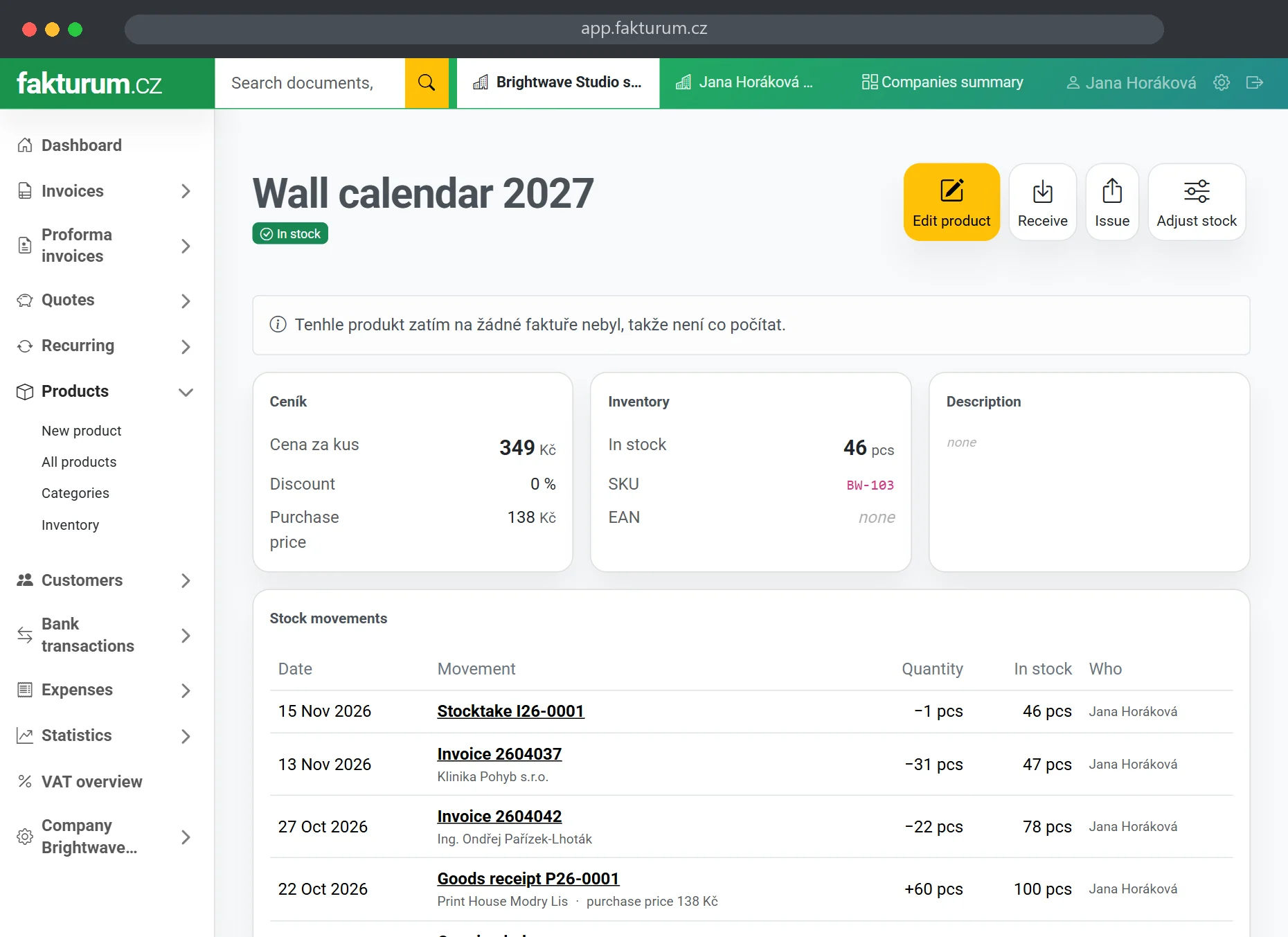
Product card with the quantity in stock, purchase price and stock movement history

A quantity
you can trust

For each product you choose whether it is goods or a service. For goods we count units: documents deduct them, you receive them, and every change shows where it came from. This is in every plan.

Goods or serviceNo stock for services
Invoices deduct stockSo do proformas, orders and cash documents
Deleting returns stockThe goods are back on the shelf
Movement historyWho, when, how many and why
Receive and IssueTwo buttons on the product card
Adjust stockType how many are really there
Price list from CSVWith quantities, no duplicates
In every planIncluding the free one

A delivery recorded
in a minute

Goods arrived? Pick the supplier, scan or type the items, add the purchase prices and save.
A goods issue records what left other than by invoice. Every document has a number and can be printed and corrected.
Goods receiptA delivery with purchase prices
Goods issueSamples, own use, damage
Barcode readerNo setup, one beep is one unit
Search by EANBy name or your own code too
New goods on a receiptCreated when you save
Own number seriesP26-0001, V26-0001
Print to PDFReceipts, issues and stocktakes
Bin and restoreA deleted document returns the stock
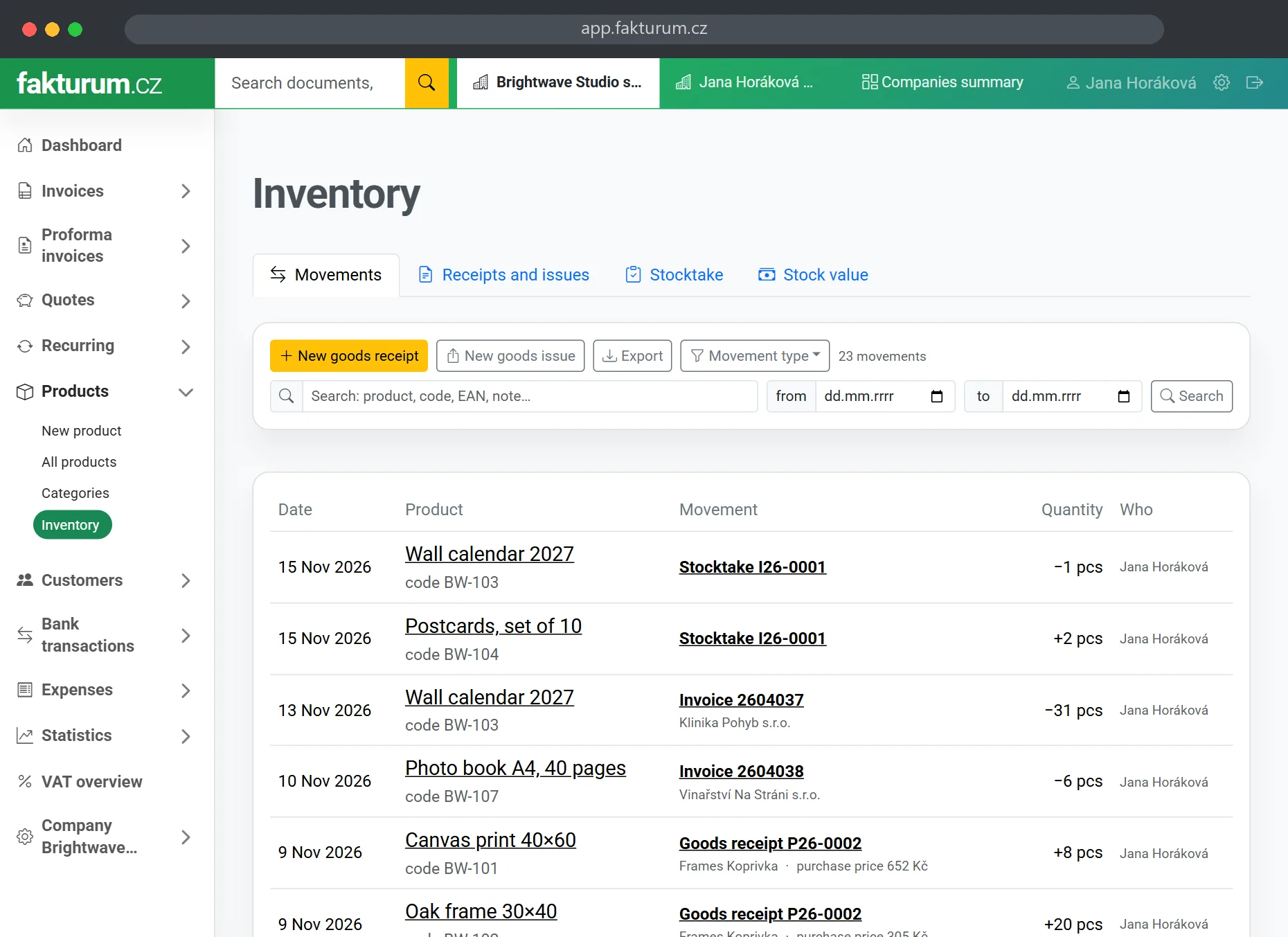
Inventory: stock movements across all products, goods receipts, stocktake and sales by invoice

All stock movements in one place: receipts, issues, sales by invoice and stocktakes. With a filter, search and spreadsheet export.

Know what you have
and what it is worth

You count a stocktake step by step and see the differences against the records at once. You can view the stock value as of any date and set, for each item, when we should warn you that it is running low.
StocktakeCount step by step, on your phone
Differences at a glance2 missing, 1 extra
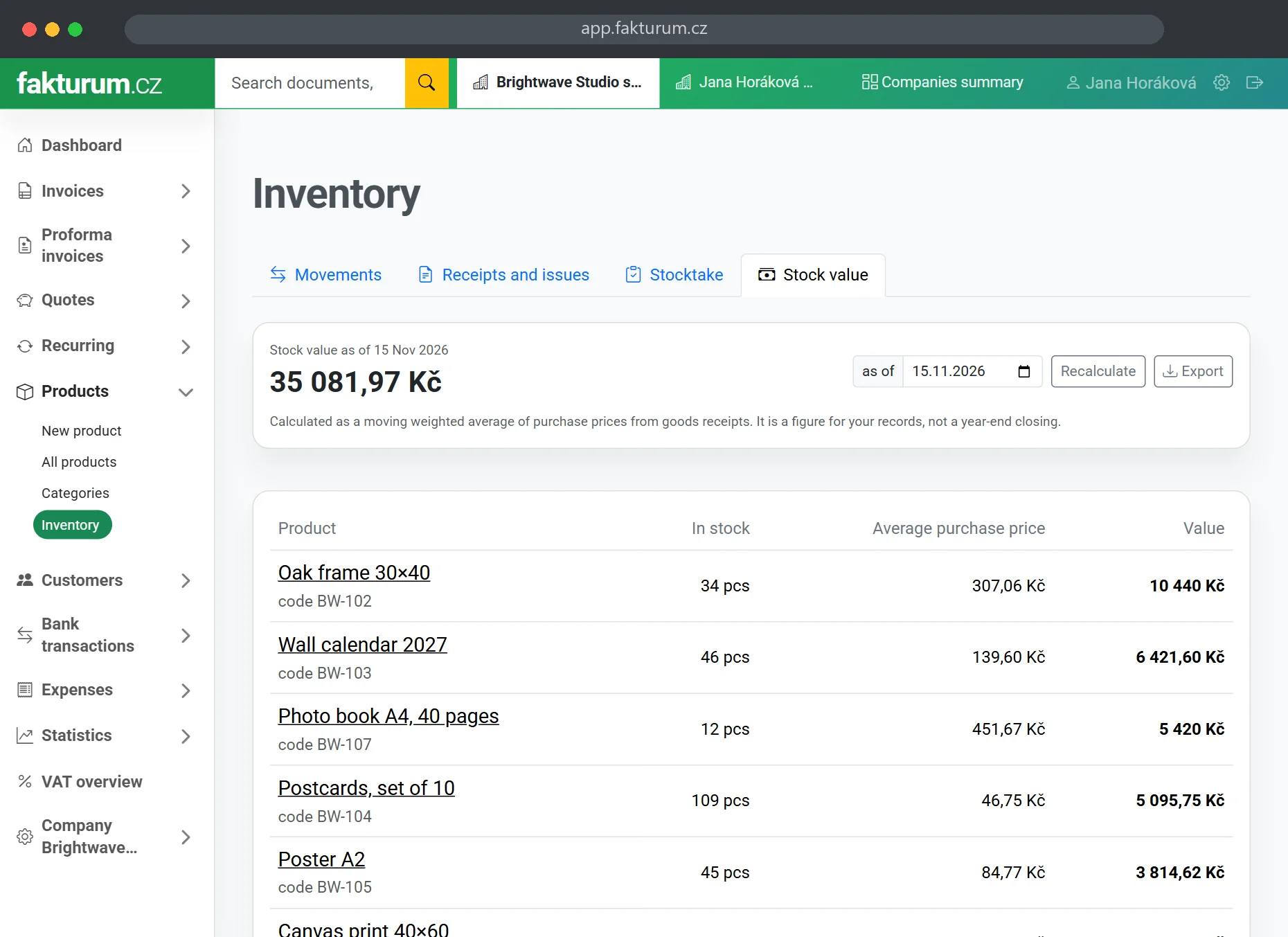
Stock valueToday or as of 31 December
Weighted averageFrom purchase prices on receipts
Minimum stockA “low stock” badge in the list
Spreadsheet exportMovements, stocktake and value
Returns by credit noteThe goods go back to stock
User permissionsA stock keeper need not see invoices
Stock value as of a date: quantity, average purchase price and value of each product

Is this inventory for you?

We built it for freelancers and small companies that sell goods and invoice. Not for a wholesaler with three halls.

It will do the job if
  • You sell goods and want to know how many of each you have
  • You invoice and do not want a separate stock spreadsheet
  • You have one warehouse or shop and tens to hundreds of items
  • You do a stocktake now and then and need it documented
  • You need the value of your stock at the end of the year
It will not be enough if
  • You need several warehouses and transfers between them
  • You track batches, expiry dates or serial numbers
  • You want orders to reserve stock
  • Your accountant requires FIFO valuation
  • An online shop with thousands of orders a day drives your stock

How do I start?

Three steps to a stock quantity that matches reality.

1

Mark what is goods

Choose Goods for a product and type how many units you have. Import a larger price list from CSV with quantities.

2

Invoice as usual

Add goods to invoices from your price list. Stock is deducted automatically, there is nothing to look after.

3

Switch on Inventory

When you want goods receipts, issues and stocktakes, switch the module on in the company settings.

Create a free account

The quantity in stock and movement history are in every plan. Goods receipts, issues and stocktakes from the Standard plan for CZK 60 a month. Pricing

Step by step guides

Inventory is one of the features of fakturum.cz invoicing software. See the feature overview for everything it does.

Frequently asked questions

Yes. When you add a product marked as goods to an invoice, the quantity in stock drops as soon as you save the document. Proforma invoices, orders and cash documents do the same. If an invoice created from an order has more units than the order, only the difference is deducted. A deleted document returns the goods, and a draft deducts nothing until you issue it.

A goods receipt records goods that arrived: the supplier, quantities and purchase prices. A goods issue records goods that left the warehouse other than by a sale, such as a sample, your own use or a damaged item. Sales to customers do not belong on a goods issue, the invoice deducts them.

On the Stocktake tab you start one for all goods or for a single category and type how many units you counted. You can count step by step, for example on your phone in the warehouse, and come back later. You see the difference against the records for every product straight away. When you close the stocktake, the differences are written to the stock movements, and you can print it or download it as a spreadsheet.

As a moving weighted average of the purchase prices on your goods receipts. You can see the value as of today or any date, typically 31 December. Products without a purchase price are listed separately so that a silent zero does not distort the total. It is a figure for your own records, not a year-end closing.

It can. We never block a sale because of stock: you can issue the invoice even if the records say the goods are not there. On a goods issue the line warns you in advance. You then fix a negative quantity with a goods receipt or the Adjust stock button.

Yes, with no setup. A reader behaves like a keyboard: on a goods receipt or goods issue you put the cursor in the Product field and scan, and every code adds one unit. Products are found by EAN, by your own code and by name.

The quantity in stock, the movement history and the Receive, Issue and Adjust stock buttons are in every plan including the free one. Goods receipts, goods issues, stocktakes and the stock value are part of the Standard plan for CZK 60 a month and of the Business plan. There is nothing extra to pay.

The fastest way is to import your price list from CSV or Excel, including quantities. If you only have a few items, create the products by hand and type how many units you have. From then on the quantity changes only through movements, so you can always trace why the number is what it is.

No, and we do not want to promise it. Inventory in fakturum is for one shop or one warehouse, without batches, serial numbers or reservations. If you need those, a specialised warehouse system will serve you better.